v2 activation gate
GaiaFTCL v2 refuses to launch until the operator issues a per-recipient access code and the recipient pastes it into the activation panel on their Mac. The check is runtime, not build-time: every install — including the operator's own Mac — must enter a code through the panel. The signature verify runs offline against an Ed25519 public key embedded in the v2 build.
This page is the end-to-end test we run before every v2 deploy. It is also the recipient-facing tutorial.
TL;DR
| Step | Who | Where |
|---|---|---|
| 1. Mint signing key (once) | Operator | gaiaftcl admin v2-keygen |
| 2. Recipient installs v2 DMG, launches | Recipient | macOS |
| 3. Recipient reads their Mac binding hash from the panel | Recipient | activation panel |
| 4. Recipient emails operator with hash | Recipient | |
| 5. Operator issues a Mac-bound code | Operator | gaiaftcl admin issue-v2-code … |
| 6. Operator emails code to recipient | Operator | |
| 7. Recipient pastes code, clicks Activate | Recipient | activation panel |
8. App writes v2_activation.toml at mode 0600 and loads the wallet |
App | offline verify |
After step 8 every subsequent launch reads the activation file and skips the panel.
What the recipient sees on first launch
When a v2 build runs and ~/Library/Application Support/GaiaFTCL/v2_activation.toml does not exist, the whole app is gated behind this panel — nothing else loads:
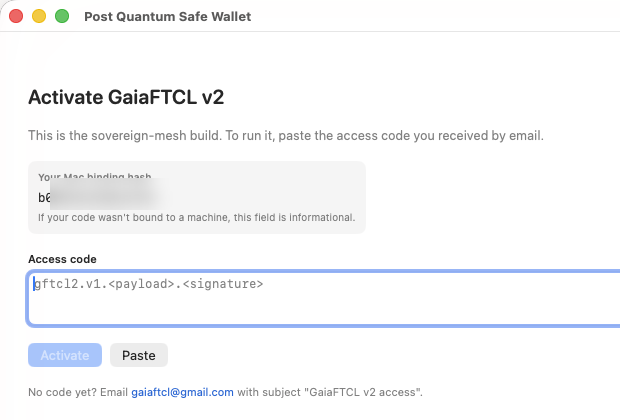
The Mac binding hash shown here is an 8-byte salted SHA-256 of the Mac's IOPlatformSerialNumber. The recipient sends this hash to the operator so the operator can issue a code bound to exactly this Mac. The code will refuse to activate on any other machine.
Operator: one-time key generation
The operator's Ed25519 signing key is generated once on a Mac the operator controls and never leaves it. The corresponding public key is embedded in each v2 build at V2ActivationGate.embeddedPublicKeyHex.
Output:
═══ v2 signing key generated ═══
  key_path:        ~/.gaiaftcl/v2_signing_key.toml
  public_key_hex:  e61573715dc01e861292b48b7fe70537a7895ce0ba775876a89dda994d4aba39
The file ~/.gaiaftcl/v2_signing_key.toml is written at mode 0600. Paste the printed public_key_hex into:
Then rebuild and sign the v2 DMG:
The resulting DMG is Developer-ID-signed (WWQQB728U5) and ships with the pubkey baked in.
Operator: per-recipient code minting
Once the recipient has installed v2 and sent you their Mac binding hash:
gaiaftcl admin issue-v2-code \
    --email alice@example.org \
    --bind-machine-hash <hash from recipient panel> \
    --expires-days 365
Output:
═══ v2 access code issued ═══
  code_id:         v2-f21433bc8976
  email:           alice@example.org
  issued_at_unix:  1780603354
  expires_at_unix: 1812139354
  machine_hash:    <your-machine-hash>
  channel:         v2-sovereign

─── envelope ───
gftcl2.v1.<base64url-payload>.<base64url-signature>

─── email draft ───
To: alice@example.org
Subject: Your GaiaFTCL v2 access code

Paste this into the "Activate v2" panel on the Mac whose
machine_hash equals <your-machine-hash>:

<envelope>

This code is single-recipient. Do not share.
Every issued code is appended to ~/.gaiaftcl/v2_access_codes_issued.toml for audit.
Copy the email draft into your mail client and send it.
Recipient: pasting the code
In the activation panel, the recipient:
- Clicks Paste (or pastes manually into the access-code field).
- Confirms the Mac binding hash printed in the panel matches the
machine_hashline in the operator's email. - Clicks Activate.
If the signature verifies against the build's embedded operator pubkey and the machine hash matches, the gate writes the activation file and loads the wallet:
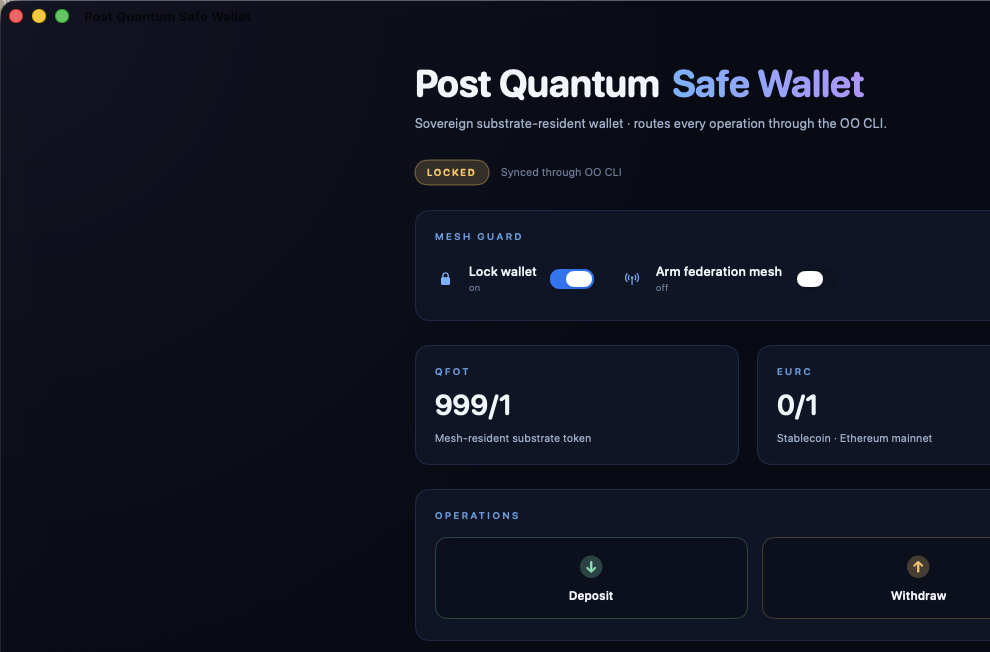
That activation file lives at ~/Library/Application Support/GaiaFTCL/v2_activation.toml, mode 0600. Format:
[v2_activation]
activated_at_iso = "2026-06-04T20:12:17Z"
code_id          = "v2-f21433bc8976"
email            = "alice@example.org"
issued_at_unix   = 1780603354
expires_at_unix  = 1812139354
machine_hash     = "<your-machine-hash>"
channel          = "v2-sovereign"
envelope         = "gftcl2.v1.…"
Subsequent launches: gate reads this file, verifies the envelope offline against the embedded pubkey, and skips the panel entirely.
Refusal modes
| Panel message | Cause |
|---|---|
REFUSED: that doesn't look like a v2 access code. |
Envelope is malformed (not gftcl2.v1.<payload>.<sig>). |
REFUSED: code payload is malformed. |
base64 decode failed or payload JSON is corrupt. |
REFUSED: signature did not verify against this build's operator key. |
Wrong pubkey or tampered envelope. |
REFUSED: this code is for a different channel. |
Code was issued for a non-v2-sovereign channel. |
REFUSED: this code has expired. Email the operator for a new one. |
expires_at_unix < now. |
REFUSED: this code is bound to a different Mac (machine hash above). |
Recipient's machine_hash ≠ payload's machine_hash. |
REFUSED: this build has no operator public key embedded — rebuild required. |
Embedded pubkey is still the placeholder 0000…. |
Revocation
On every successful activation and on each subsequent launch, the app makes a best-effort 6-second GET to https://gaiaftcl.com/downloads/v2_revoked_codes.json. The expected shape:
If the activated code_id appears in that list, the activation file is rejected and the panel returns. To revoke a code, append its code_id to that JSON file on the apex.
Offline activation still works — revocation kicks in next time the recipient's Mac is online when the app boots.
Operator dry-run: verifying a minted code
To smoke-test a freshly-issued code without driving the GUI:
Output on success:
pubkey hex (from file): e61573715dc01e861292b48b7fe70537a7895ce0ba775876a89dda994d4aba39
machine_hash (this Mac): <your-machine-hash>
VERIFY OK
  code_id:    v2-f21433bc8976
  email:      alice@example.org
  expires_at: 1812139354
  machineHash: <your-machine-hash>
Exit codes: 0 OK, 7 verify failed (signature/channel/expiry/machine), other codes for setup errors.
Resetting activation on a recipient Mac
If a recipient needs to re-activate (machine swap, expired code, manual reset):
The next launch shows the activation panel again.
Threat model — what this does and does not stop
Stops:
- A recipient sharing the v2 DMG URL with a friend who didn't get a code from you.
- A leaked code being used on a Mac other than the one it was bound to.
- A tampered envelope (any byte change invalidates the Ed25519 signature).
- A previously-issued code that you decide to revoke after the fact.
Does not stop:
- A determined attacker binary-patching the gate check out of the DMG. The signature on the outer
.app(Developer ID, WWQQB728U5) detects tampering; macOS Gatekeeper refuses the modified bundle on opening. Notarization closes the remaining quarantine path. - Two recipients pasting the same code onto the same Mac (the code is single-recipient by audit, not by enforcement — track this in your issued log).
- A recipient who keeps the activation file alive past code expiry by setting their system clock backwards. Expiry is checked at decode time using
Date().
Quick reference
# Operator
gaiaftcl admin v2-keygen
gaiaftcl admin show-v2-pubkey
gaiaftcl admin issue-v2-code --email <r> --bind-machine-hash <h> --expires-days 365
gaiaftcl admin verify-v2-code "<envelope>"

# Recipient
# (open v2 DMG, drag GaiaFTCL.app to Applications, double-click)
# panel opens → paste code → Activate

# Reset
rm ~/Library/Application\ Support/GaiaFTCL/v2_activation.toml
Federation-cosigned
This page's source is sealed in the GaiaFTCL federation manifest — page SHA-256 ff3e0ef7a325bb54…, manifest witness 3d999b305397d96c…, signed 2026-07-17T15:45:53Z by cell gaiaftcl-mac-cell. Verify with gaiaftcl wiki sign --all and compare wiki-all-signatures.json.